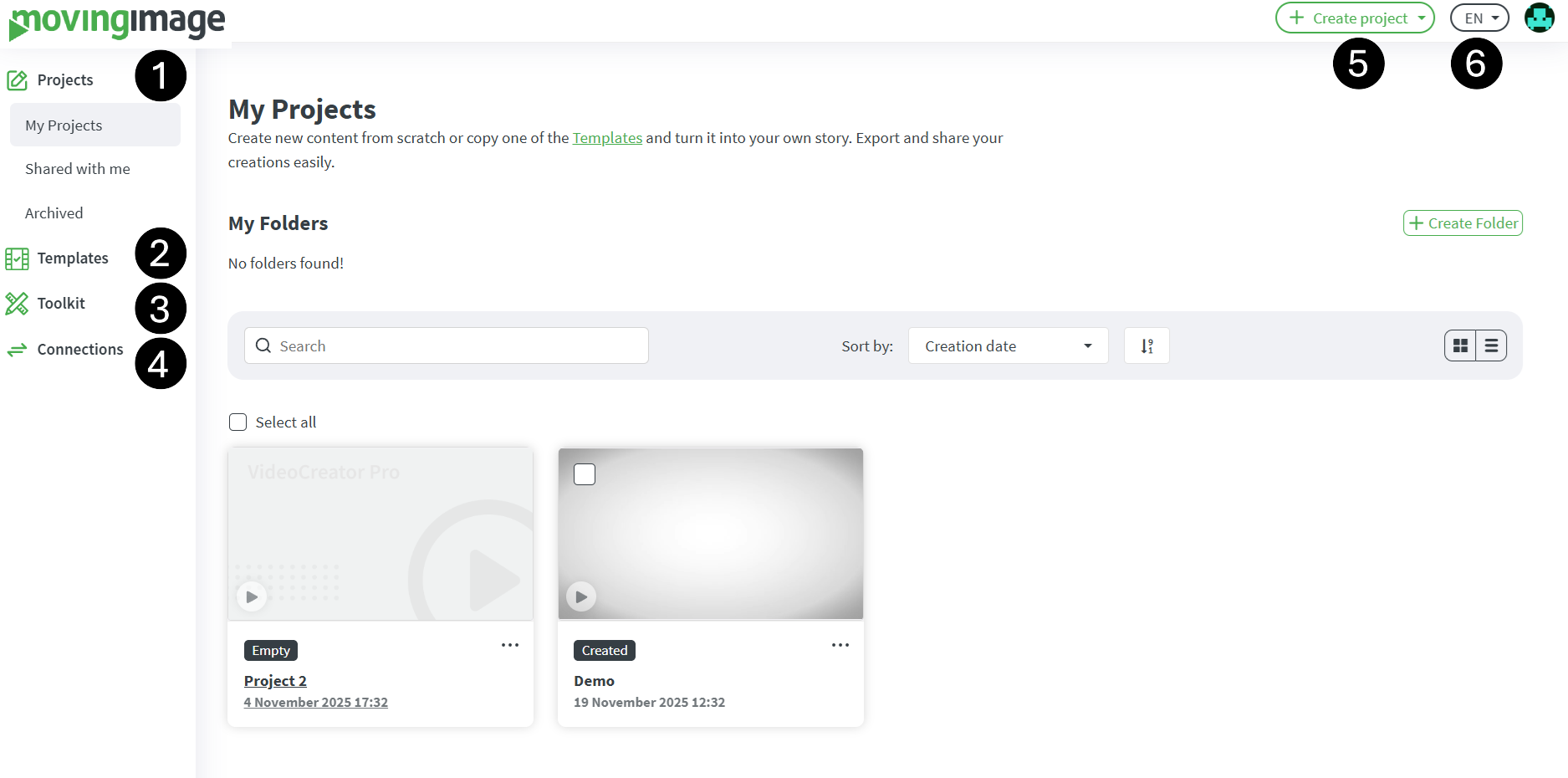
Upon successful login to VideoCreator Pro, users are directed to the Dashboard — the primary landing page. The Dashboard provides centralized access to the platform’s core features and tools, designed to facilitate efficient project management and video creation.
Below is an overview of the key functions available on the landing page:
Number
Description
1
My Projects - Here you will see the overview of your projects.
Shared with me - Projects shared with you by other VideoCreator Pro users.
Archived - Archived projects that you can review or permanently delete as required.
2
Templates
Browse and preview templates to quickly assess their design and content.
You can either:
Edit the template to customize it for your project, or
Copy it with one click to create a new version without changing the original.
3
Tool Kit
This section provides a collection of specialized video tools and shortcuts intended to optimize your editing workflow.
4
Connections
This section offers integration options that connect VideoCreator Pro with external platforms and services, streamlining workflows and video distribution.
5
Create Project
New projects can be created from the Dashboard from scratch, using a template, with AI-driven video generation, or by converting text into video.
6
Language
The user interface language can be modified to suit individual preferences. Select the desired language from the available options.